
Reports and payouts
Know your numbers before your accountant does.
Revenue, occupancy and retention update live, not in a month-end export. Payouts, fees and the settlement schedule sit on one page. Instructor pay is computed from the schedule. And when the accountant asks, the CSV is one click.
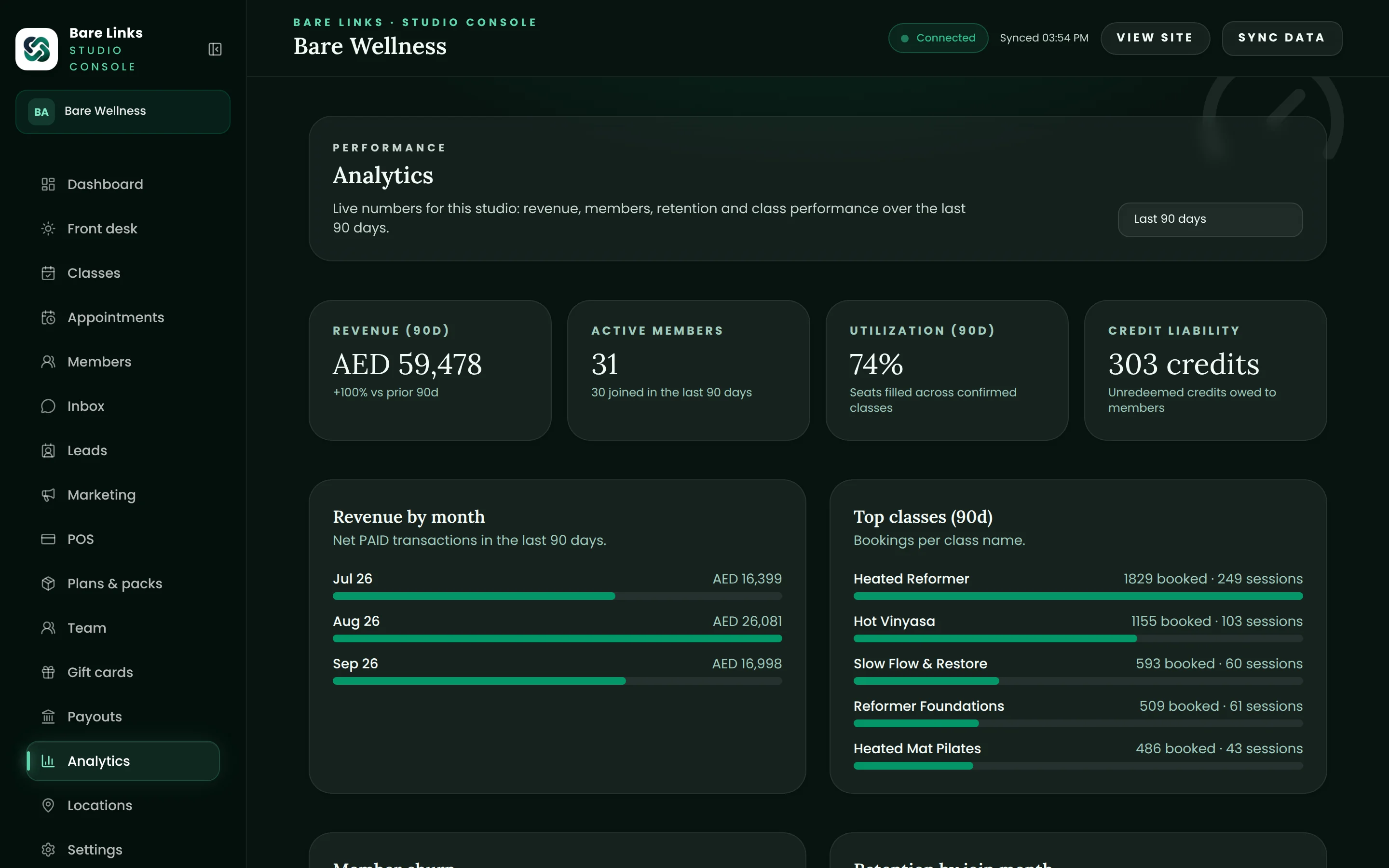
The reports owners actually run.
Revenue by product and channel, occupancy by class and time of day, new versus returning members, churn and retention cohorts, and instructor utilisation. Filter by date, location and instructor.
- Revenue, occupancy and attendance, live
- Retention cohorts by joining month
- Utilisation by instructor and time of day
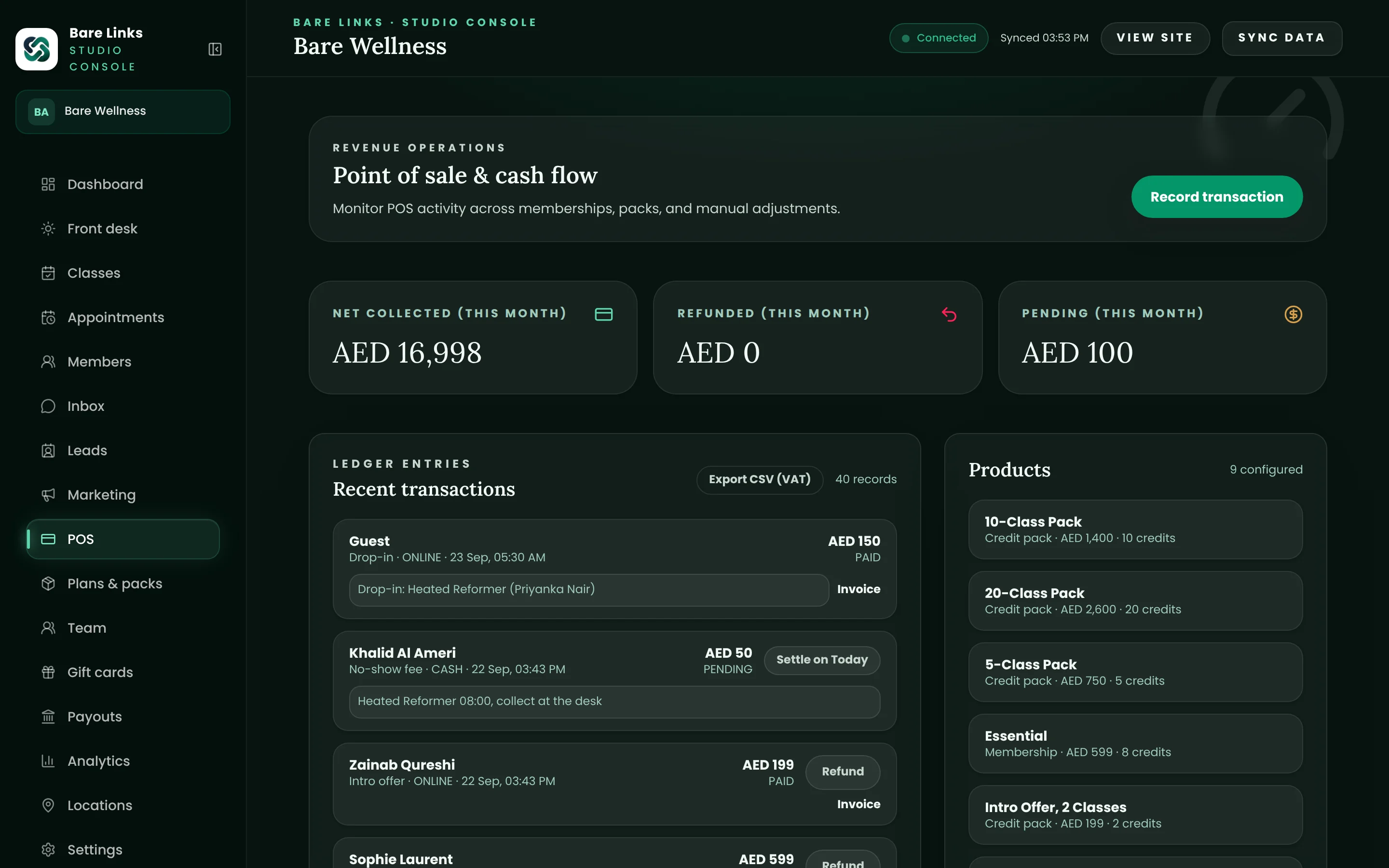
Payouts in plain sight.
Balance, next payout date, payout history and the exact processing fee on each payment, read directly from your own Stripe account. No more guessing which deposit was which.
- Balance and schedule
- Fee breakdown per payment
- Payout history matched to your bank statement
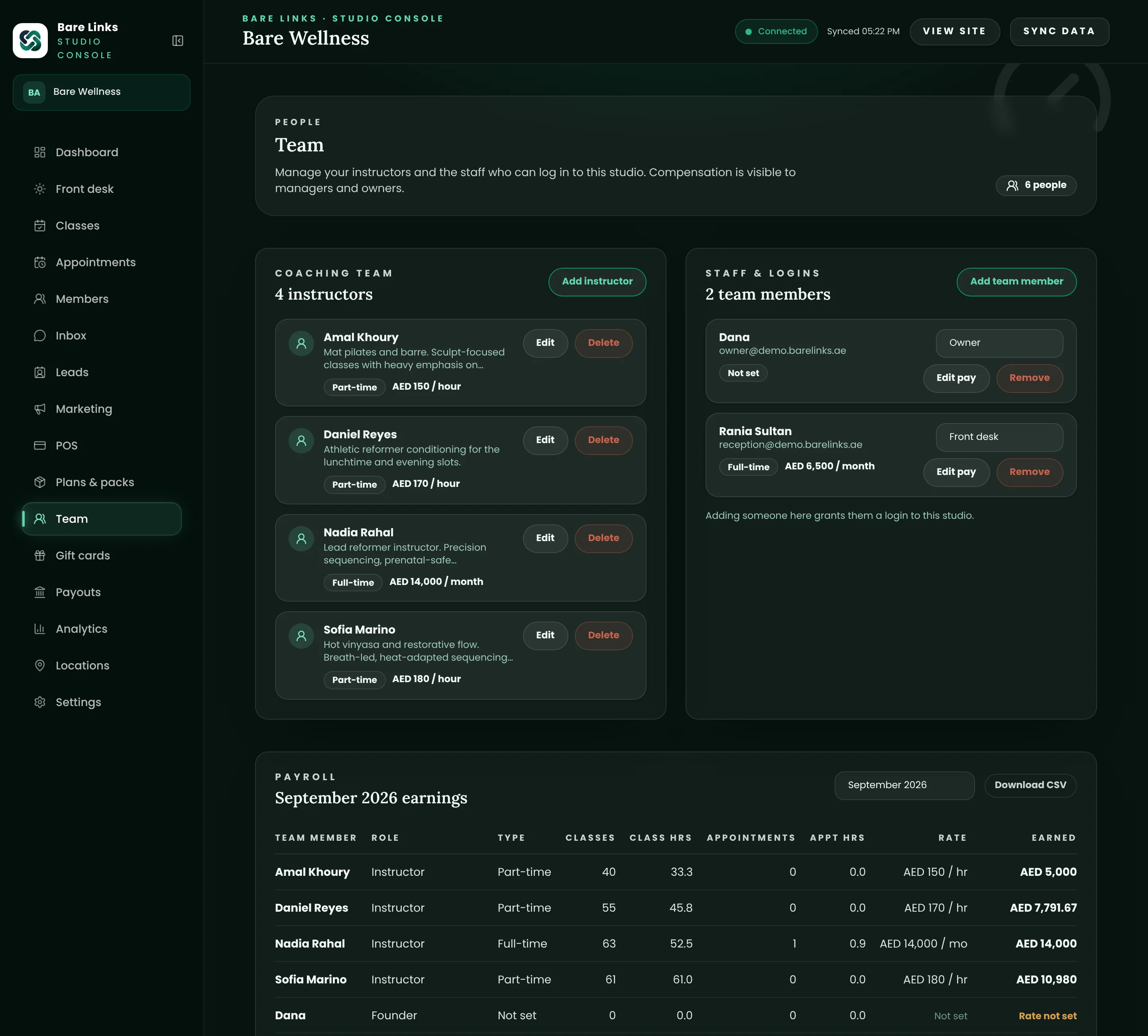
Instructor pay without the spreadsheet.
Each instructor's delivered classes and earnings for the month are computed from the schedule and your pay rules. Export the CSV, pay them, done.
- Per-class rates for part-time instructors, salaries for full-time
- Covers and cancellations reflected in the count
- Month-end CSV per instructor
Exports your accountant will thank you for.
Transactions, invoices, credit notes and members export as CSV for any period. Tax invoices and credit notes carry the fields a VAT return needs. Your data is yours to take at any time.
- Transactions and invoices by period
- Member list with balances
- No export request queue, no fee
The reports owners actually run.
Revenue by product and channel, occupancy by class and time of day, new versus returning members, churn and retention cohorts, and instructor utilisation. Filter by date, location and instructor.
- Revenue, occupancy and attendance, live
- Retention cohorts by joining month
- Utilisation by instructor and time of day
Payouts in plain sight.
Balance, next payout date, payout history and the exact processing fee on each payment, read directly from your own Stripe account. No more guessing which deposit was which.
- Balance and schedule
- Fee breakdown per payment
- Payout history matched to your bank statement
Instructor pay without the spreadsheet.
Each instructor's delivered classes and earnings for the month are computed from the schedule and your pay rules. Export the CSV, pay them, done.
- Per-class rates for part-time instructors, salaries for full-time
- Covers and cancellations reflected in the count
- Month-end CSV per instructor
Exports your accountant will thank you for.
Transactions, invoices, credit notes and members export as CSV for any period. Tax invoices and credit notes carry the fields a VAT return needs. Your data is yours to take at any time.
- Transactions and invoices by period
- Member list with balances
- No export request queue, no fee
Also included
The details that make the module complete.
Every item below ships on every plan unless the pricing page says otherwise.
Live dashboard
Today's bookings, sales and check-ins the moment they happen.
Multi-location
Roll-ups across locations on the Scale plan.
Partner reconciliation
Monthly exports per Privilee, ClassPass and corporate partner.
Failed payments
A worklist of outstanding renewals and what has been sent.
Audit log
Who changed what, exportable.
Data ownership
Full CSV export while your subscription is active and during the grace period after it ends.
Questions owners ask
Questions about reports and payouts.
Short answers. If yours is missing, ask on the demo call.
Can my accountant log in?
Give them a manager account limited to reports and exports, or send the monthly CSV pair. Either works; most studios send the CSV.
Does the revenue report match the money in the bank?
Revenue is reported on the sale date and settlement arrives a few business days later, so the two will differ within a month and match across it. The payouts page shows exactly which sales are in which payout.
Can I see which instructors fill classes?
Yes. Occupancy and attendance by instructor and by time of day are standard reports.
Built for
- Pilates and yoga
Reformer spot booking, mat classes, packs and privates.
- Gyms and fitness
Memberships, class timetables, boxing and small-group training.
- Clinics and physio
Appointments, packages and records, with tax invoices.
The rest of the platform
- Scheduling and booking
Classes, waitlists, spot selection and appointments.
- Memberships and packs
Recurring memberships, credit packs, freezes and intro offers.
- Payments and invoicing
AED card payments, Apple Pay, FTA tax invoices and payouts.
- Front desk and check-in
The morning rush on one screen, plus Privilee and ClassPass.
- Marketing and automations
Welcome journeys, win-backs, leads and campaigns.
See your studio on Bare Links.
Start a 14-day free trial and set up your studio yourself in minutes, or book a walkthrough with our Abu Dhabi team, tailored to your schedule, packs and current platform, with a written switch plan and no obligation.