
Scheduling and booking
A schedule your members can book in three taps.
Publish classes, workshops and appointments once. Members book from your own link, pick their reformer or mat, join a waitlist when a class is full, and get reminded the day before. Your team sees the same schedule at the desk.
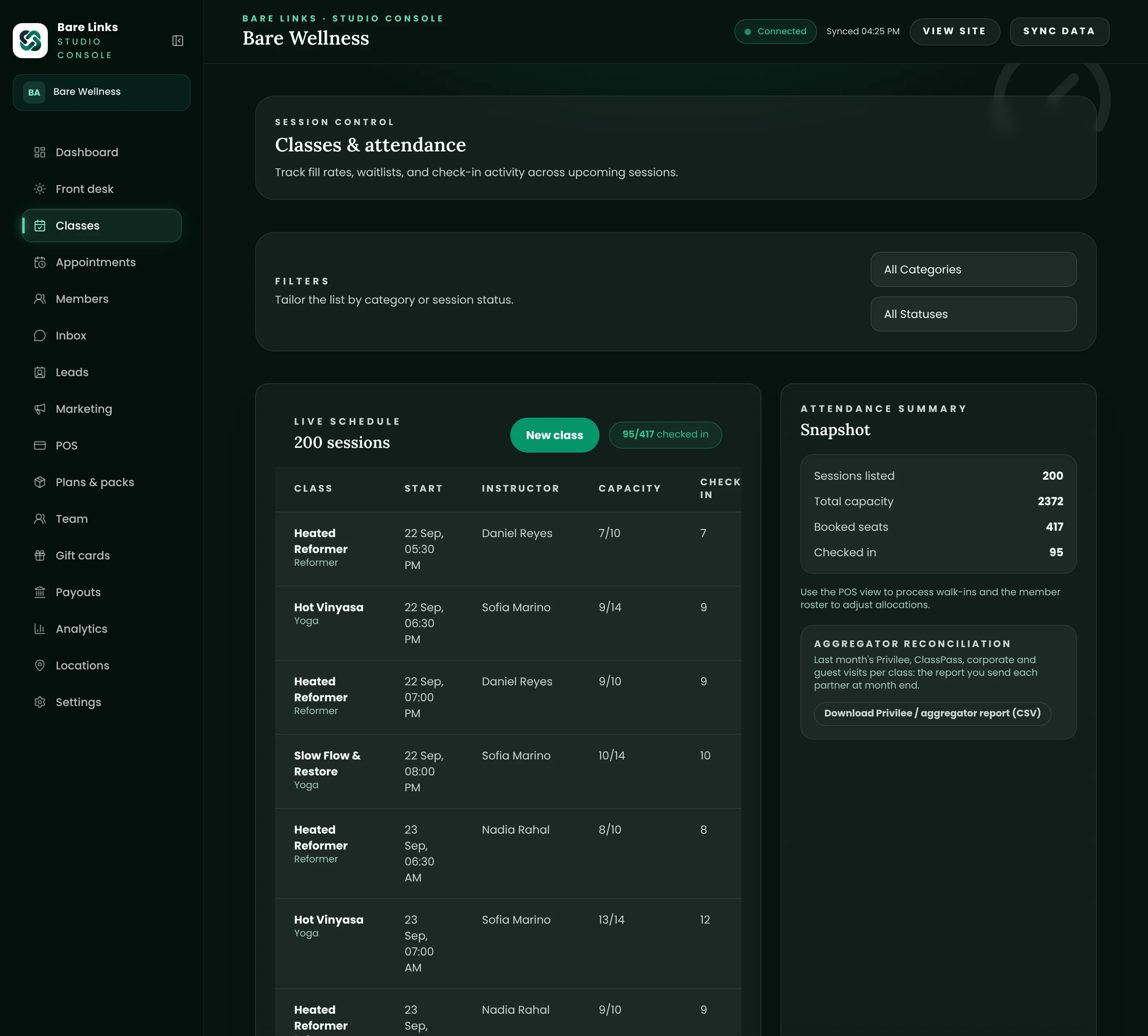
Build the timetable once, then let it run.
Set up each class format with its capacity, duration, instructor and price, then lay out the weekly grid. Sessions generate themselves from the template, so a change to Tuesday's 07:00 flows through without retyping anything. Holidays, cover instructors and one-off workshops sit on top of the pattern.
- Recurring weekly templates with per-session overrides
- Capacity, instructor and room on every session
- Workshops and events with their own price and capacity
Waitlists that fill the class for you.
When a member cancels inside the window, the next person on the waitlist is booked automatically and emailed on the spot. Credits are taken and returned correctly on both sides, so nobody is charged for a class they never got into.
- Automatic promotion in cancellation order
- Late-cancel and no-show rules you set per studio
- Members can leave a waitlist themselves at any time
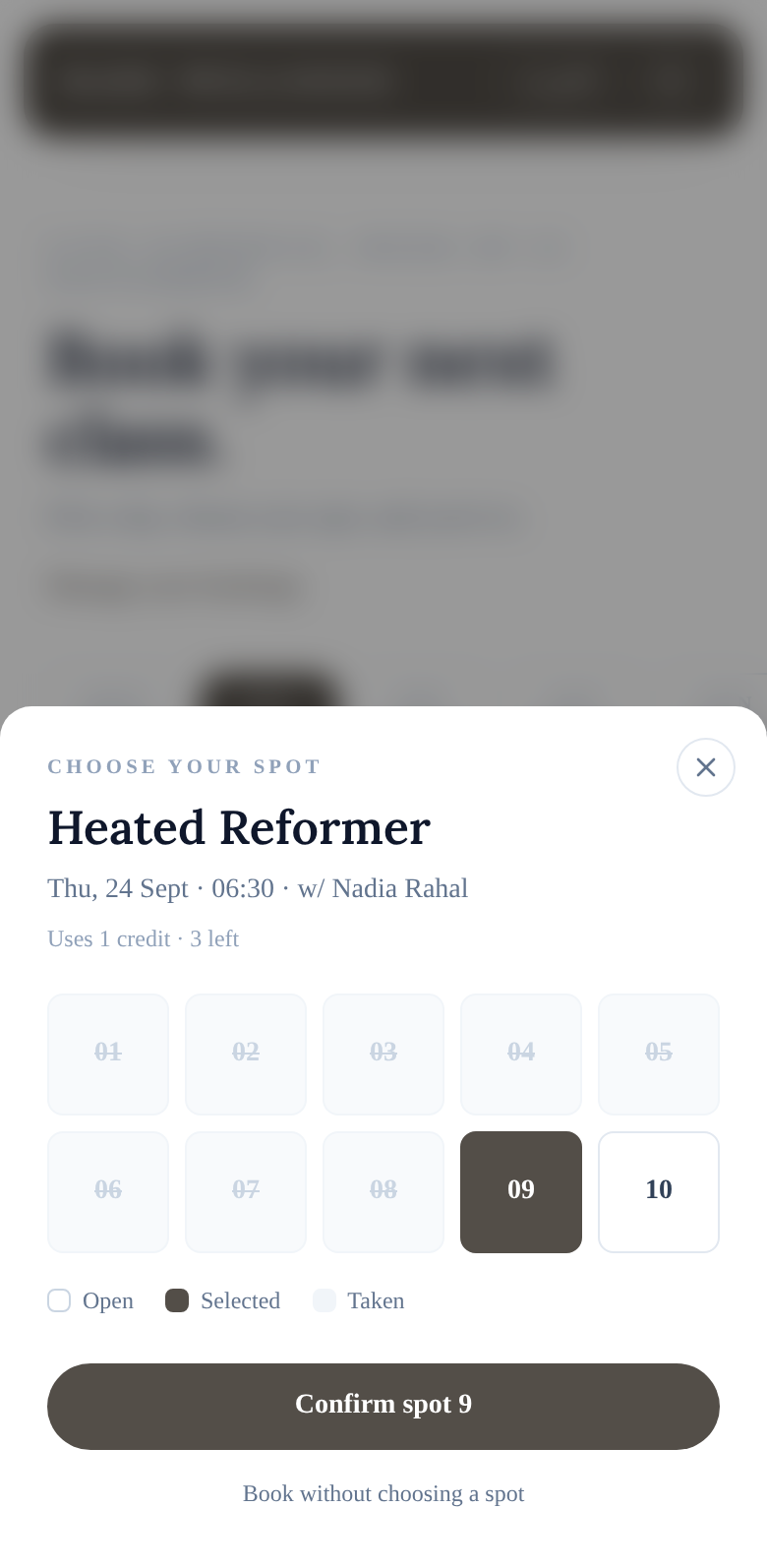
Pick a reformer, a bike or a mat.
Spot selection is part of every plan. Members choose their exact bed or mat from the layout you set up once, and the front desk sees who is where before the class starts.
- Spots per room, named the way you name them
- Works for reformers, bikes, mats and treatment rooms
- Held spots for partner bookings such as Privilee
Appointments and privates, without the back and forth.
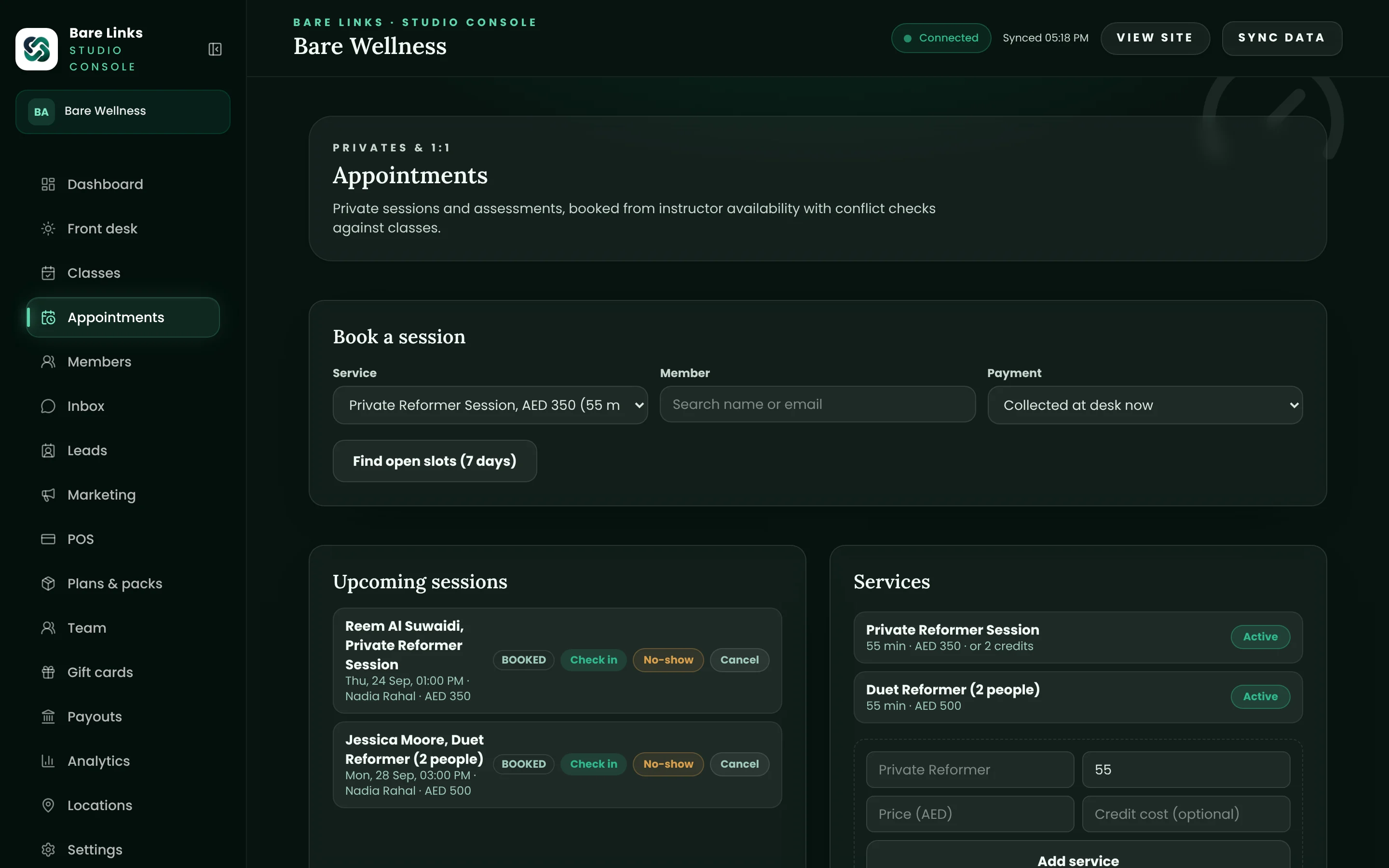
Instructors and therapists set their availability. Members book one-to-one sessions from the same portal, and the system refuses double bookings at the database level, so two people can never hold the same slot.
- Availability per instructor, per day
- Services with their own length and price
- Conflicts blocked before they happen, not cleaned up after
Reminders that actually reduce no-shows.
Every booking gets a reminder the day before and again two hours out, with a calendar invite attached. Once your studio's WhatsApp number is verified with Meta, the same reminders go out on WhatsApp in English or Arabic.
- Email reminders from day one
- WhatsApp reminders once your number is verified
- Arabic and English, based on the member's choice
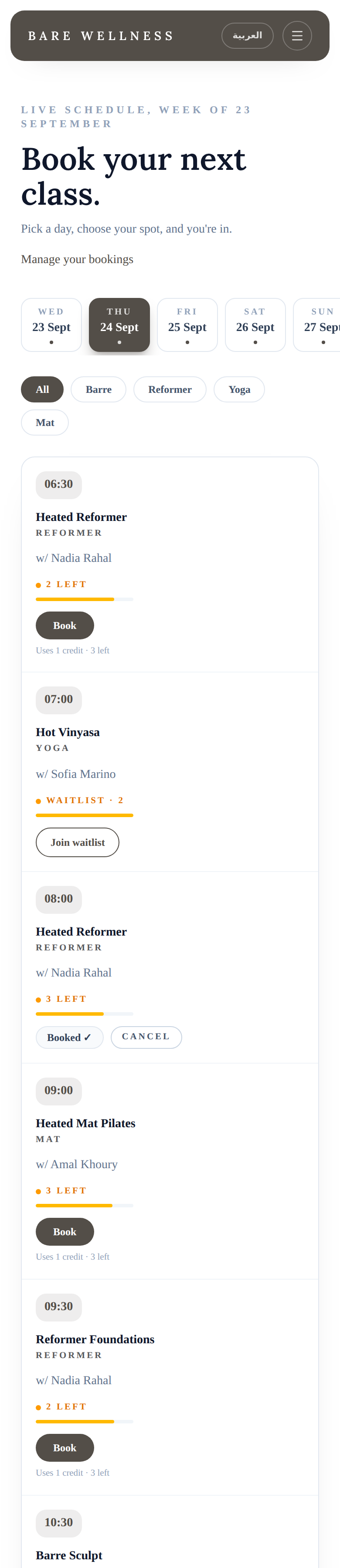
Build the timetable once, then let it run.
Set up each class format with its capacity, duration, instructor and price, then lay out the weekly grid. Sessions generate themselves from the template, so a change to Tuesday's 07:00 flows through without retyping anything. Holidays, cover instructors and one-off workshops sit on top of the pattern.
- Recurring weekly templates with per-session overrides
- Capacity, instructor and room on every session
- Workshops and events with their own price and capacity
Waitlists that fill the class for you.
When a member cancels inside the window, the next person on the waitlist is booked automatically and emailed on the spot. Credits are taken and returned correctly on both sides, so nobody is charged for a class they never got into.
- Automatic promotion in cancellation order
- Late-cancel and no-show rules you set per studio
- Members can leave a waitlist themselves at any time
Pick a reformer, a bike or a mat.
Spot selection is part of every plan. Members choose their exact bed or mat from the layout you set up once, and the front desk sees who is where before the class starts.
- Spots per room, named the way you name them
- Works for reformers, bikes, mats and treatment rooms
- Held spots for partner bookings such as Privilee
Appointments and privates, without the back and forth.
Instructors and therapists set their availability. Members book one-to-one sessions from the same portal, and the system refuses double bookings at the database level, so two people can never hold the same slot.
- Availability per instructor, per day
- Services with their own length and price
- Conflicts blocked before they happen, not cleaned up after
Reminders that actually reduce no-shows.
Every booking gets a reminder the day before and again two hours out, with a calendar invite attached. Once your studio's WhatsApp number is verified with Meta, the same reminders go out on WhatsApp in English or Arabic.
- Email reminders from day one
- WhatsApp reminders once your number is verified
- Arabic and English, based on the member's choice
Also included
The details that make the module complete.
Every item below ships on every plan unless the pricing page says otherwise.
Your own booking link
yourstudio.barelinks.ae from day one. Put it on your website, Instagram and Google profile.
Arabic in one tap
Members switch the whole booking experience to Arabic, right to left.
Guest drop-ins
Put a drop-in price on any class and first-timers pay without creating an account.
Gift cards
Sell gift cards online and at the desk, redeemable against any purchase.
Self check-in
Members can check themselves in from their phone when they arrive.
Home-screen app
The portal installs on a phone like an app, under your name and icon, with no app store.
Questions owners ask
Questions about scheduling and booking.
Short answers. If yours is missing, ask on the demo call.
Can members book without creating an account?
Yes. Any class or workshop can carry a drop-in price. Guests pay by card or wallet and receive a tax invoice, and you see them on the roster like anyone else.
Do you support classes at more than one location?
Yes. Rooms and locations sit under one studio, and the Scale plan runs several locations under one console with the same members and packs.
What happens when an instructor is off?
Assign a cover instructor to the affected sessions, or cancel them. Booked members are notified and their credits are returned automatically.
Built for
- Pilates and yoga
Reformer spot booking, mat classes, packs and privates.
- Gyms and fitness
Memberships, class timetables, boxing and small-group training.
- Clinics and physio
Appointments, packages and records, with tax invoices.
The rest of the platform
- Memberships and packs
Recurring memberships, credit packs, freezes and intro offers.
- Payments and invoicing
AED card payments, Apple Pay, FTA tax invoices and payouts.
- Front desk and check-in
The morning rush on one screen, plus Privilee and ClassPass.
- Marketing and automations
Welcome journeys, win-backs, leads and campaigns.
- Reports and payouts
Revenue, occupancy, retention and where the money is.
See your studio on Bare Links.
Start a 14-day free trial and set up your studio yourself in minutes, or book a walkthrough with our Abu Dhabi team, tailored to your schedule, packs and current platform, with a written switch plan and no obligation.